Gambling.com — Product Design
A fully compliant, multi-component Sports Quiz Hub I designed, built, and shipped end-to-end — two weeks pushing our workflow to work with AI as a design partner, with research-backed system rules driving every decision.
View the live prototypeMy Role
Sole Designer & Builder
Domain
All Geos
Timeline
2 Weeks
Status
In Product Review
The Idea
The Sports Quiz Hub is a content feature on gambling.com designed to drive user engagement between betting events — quizzes give users a reason to return to the site when there's no live game. The page surfaces multiple quiz cards, tracks user streaks, and awards badges on completion. It's a mid-funnel retention feature targeting existing registered users.
The GDC Orion Design System had been built out across Figma — button variants, filter pills, card components, tag types, colour tokens, typography rules. The question was whether that system was documented precisely enough to be used as a direct input to an AI build tool.
The Sports Quiz Hub was chosen as the test case: a multi-component, fully interactive page that would exercise the design system end-to-end. I built the entire page myself using Claude Code, guided by a skill.md file I authored from scratch — no wireframes, no handoff document, no pre-existing codebase. The project was as much about mastering AI as a research-driven design partner as it was about shipping the page.
The Challenge
A design system lives in Figma. An AI builds from text. The challenge was translating one into the other — capturing every component rule, every token, every spacing decision precisely enough that the output would be indistinguishable from a hand-coded implementation.
If the skill.md was too vague, the AI would drift from the system. If it was too rigid, the output would be brittle. The right level of specificity was the core design problem.
The skill.md File
Before writing a single line of UI, the skill.md was built — a structured markdown file that encoded every relevant GDC Orion component with exact specifications: dimensions, radii, colours, weight, states, and usage rules. This became the single source of truth for every Claude Code prompt that followed.
The first output wasn't close to what we normally ship. Filter pills came back in the wrong active state colour, score numbers rendered in blue instead of the spec black, and several components missed brand details entirely. So the work became iterative — dozens of prompts, with the skill.md updated after every drift. Each gap in the output was traced back to a gap in the spec; the rule was tightened, the prompt re-run, and the next pass got closer to the system. By the end, the skill.md had absorbed every assumption the AI had silently made, and the output read as GDC-system-compliant by default.
Button System
4 types: btn-primary (blue, exit links only), btn-black (internal CTAs), btn-white (secondary), btn-ghost (dismissal). Sharp 4px radius, 304×56px, SemiBold 16px.
Filter Pills
Pill shape (84px radius), 39px height, SemiBold. Default: white bg, black border. Active: black bg, no border, white text. Hover: dark bg.
Cards
12px radius max. No shadow at rest — border only. Shadow on hover. Explicit white background (#FFFFFF) to lift off page grey (#F3F4F6).
Tags
Feature Tag: rgba(255,255,255,0.8) bg, black text, gray border. Green Tag: #e4faf3 bg, #016742 text — streaks and Today's Quiz only. 100px radius, Bold 14px.
Typography
Red Hat Display only. Body text #000000. Blue restricted to links and CTAs — never data figures. Min font size 0.79rem (12.64px). No italics.
Colour Tokens
Primary CTA: #0157FF. Hover: #003EE6. Page bg: #F3F4F6. Cards: #FFFFFF. Score numbers: var(--fg-1) black. Check icons: #8CD221 (ticks only).
What a skill.md achieves
The difference between an AI that drifts and an AI that ships
Without the skill.md, Claude Code produces plausible UI but not GDC-compliant UI — it defaults to generic patterns, arbitrary radii, and mismatched colour usage. The skill.md is the constraint layer that channels the AI's output through the exact rules of the design system. The result is a page that doesn't just look close — it follows the spec at every component level.
Constraints
The project was bounded by the GDC Orion Design System — every component, token, and spacing decision was fixed. There were no wireframes and no prior codebase to reference. The entire deliverable had to be production-quality HTML/CSS, not a prototype — it was going directly into product review. The two weeks broke down as: one week building the skill.md from scratch — analysing every component, usage rule, and CSS class mapping across the design system — and a second week running the Sports Quiz Hub build, with the skill.md updated each time the output missed the mark.
Process
The entire page was built through a series of structured Claude Code prompts — each referencing the skill.md and building on the previous output. No wireframes, no Figma-first workflow. The skill.md was the design document.
Once the page reached production quality, it was captured and converted into Figma — reversing the usual design-to-code flow and creating a living record of the system in action.
Write the skill.md
Encoded every GDC Orion component — buttons, filters, cards, tags, typography, colour tokens — as precise, machine-readable rules with explicit values and usage constraints.
Prompt the full page structure
Used Claude Code with the skill.md to generate the complete Sports Quiz Hub layout — nav, hero stats, Quiz of the Day, quiz card grid, filter system, leaderboard sidebar, and soft gate — in a single session.
Catch the drift, fix the spec
The first output had two clear violations: filter pills used a blue active state (the AI's default assumption) instead of the GDC-spec black background, and score numbers rendered in #0157FF instead of the required black. Both were caught against the skill.md and corrected by adding explicit override rules. These failures were as useful as the successes — they showed exactly where the spec needed more precision.
Convert output to Figma
Screenshotted and rebuilt the final page in Figma for documentation and stakeholder review — completing the loop from design system to live page back to design file.
Key Decisions
Three decisions defined how this project differed from a standard design process — and each one was deliberate.
Specificity level in the skill.md
Exhaustive, explicit values were used (exact px, exact hex, explicit usage rules) over high-level guidelines — because vague rules produce plausible but non-compliant output. The AI needs the same precision a developer gets from a Figma handoff.
Code-first, Figma-third
I built the live page before creating the Figma file — inverting the conventional Figma-first workflow — because the goal was to stress-test the design system as a build input, not to produce a design artefact.
Keeping failures in the spec
When the AI produced a blue filter active state (instead of GDC black), I added an explicit override rule to the skill.md rather than fix it in post — because the skill.md needed to encode every edge case for the next build to benefit from this one.
The Output
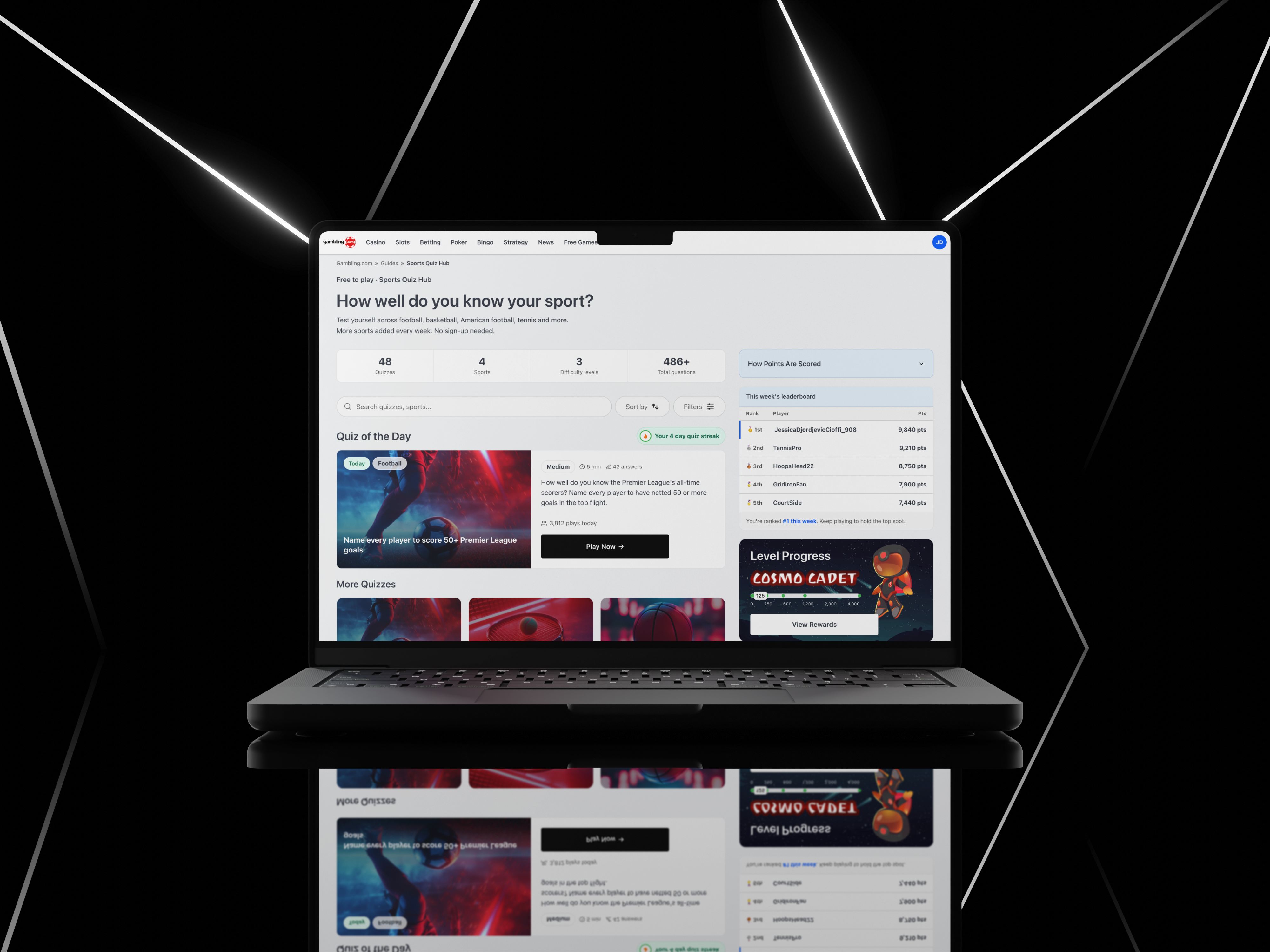
This is the Sports Quiz Hub page as generated by Claude Code on the first complete run — guided entirely by the skill.md file and GDC Orion design system rules. No prior codebase, no wireframes. The result was a fully functional, responsive, multi-component page that passed a GDC design system compliance review.
Visible in the output: the streak badge uses the Green Tag style (#e4faf3 background, #016742 text) rather than a blue pill — placing it contextually beside the quiz card title so users immediately see their progress without it competing with the CTA. The quiz card structure separates the difficulty tag (Feature Tag, white at 80% opacity) from the category label, because they serve different orientation tasks — one tells you how hard the quiz is, the other tells you what it's about. The timer element sits inside the card rather than floating above it, keeping the time pressure visible at a glance without pulling focus from the question count or the "Start Quiz" CTA.
Final Output
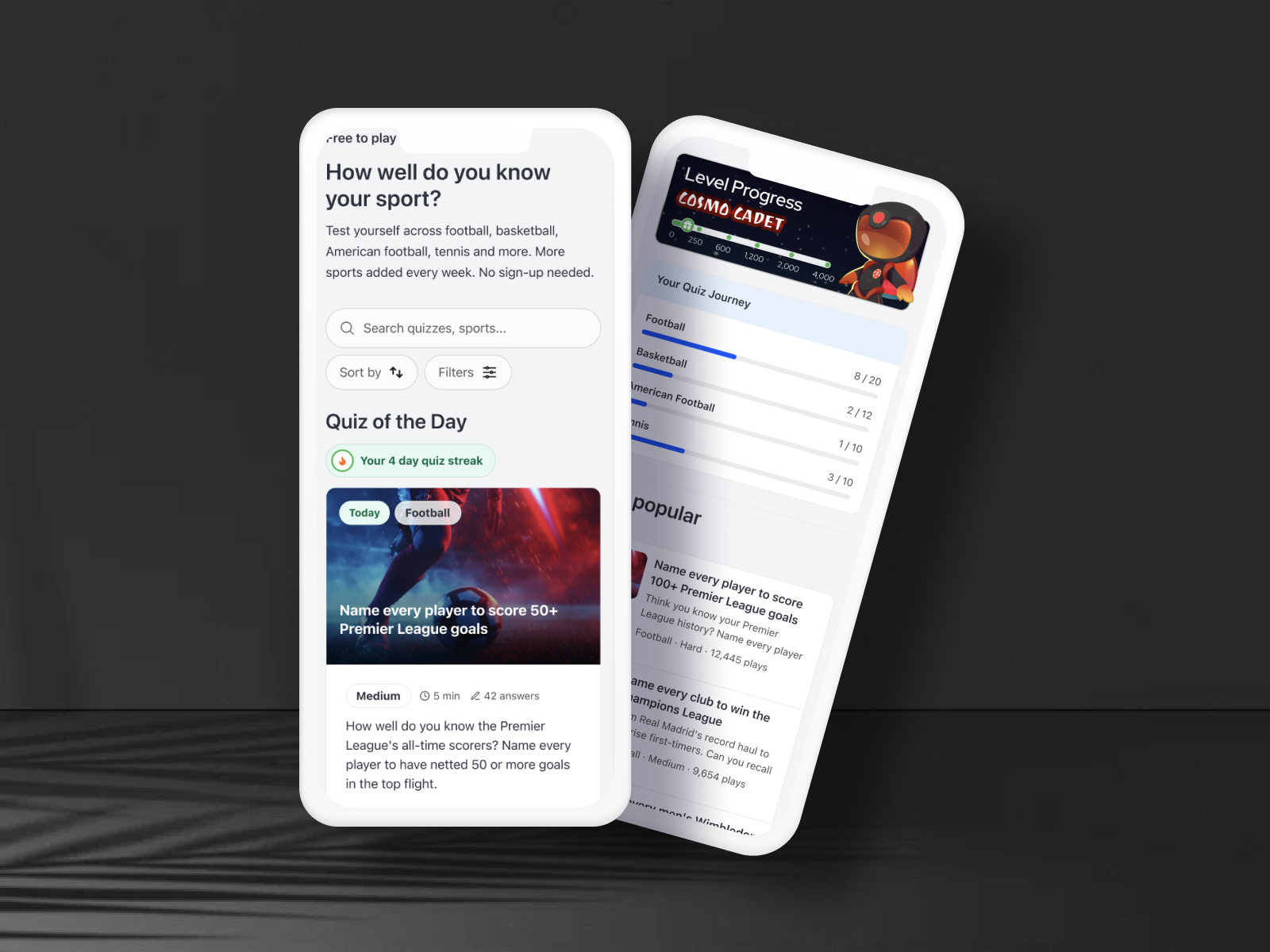
After several iterations through Claude Code — with VS Code open alongside to inspect the live DOM, debug spacing tokens, catch off-brand colour usage, and refine spec gaps in the skill.md after every drift — the page reached production parity with the GDC Orion design system. Below: the final desktop and mobile views.
Figma Conversion
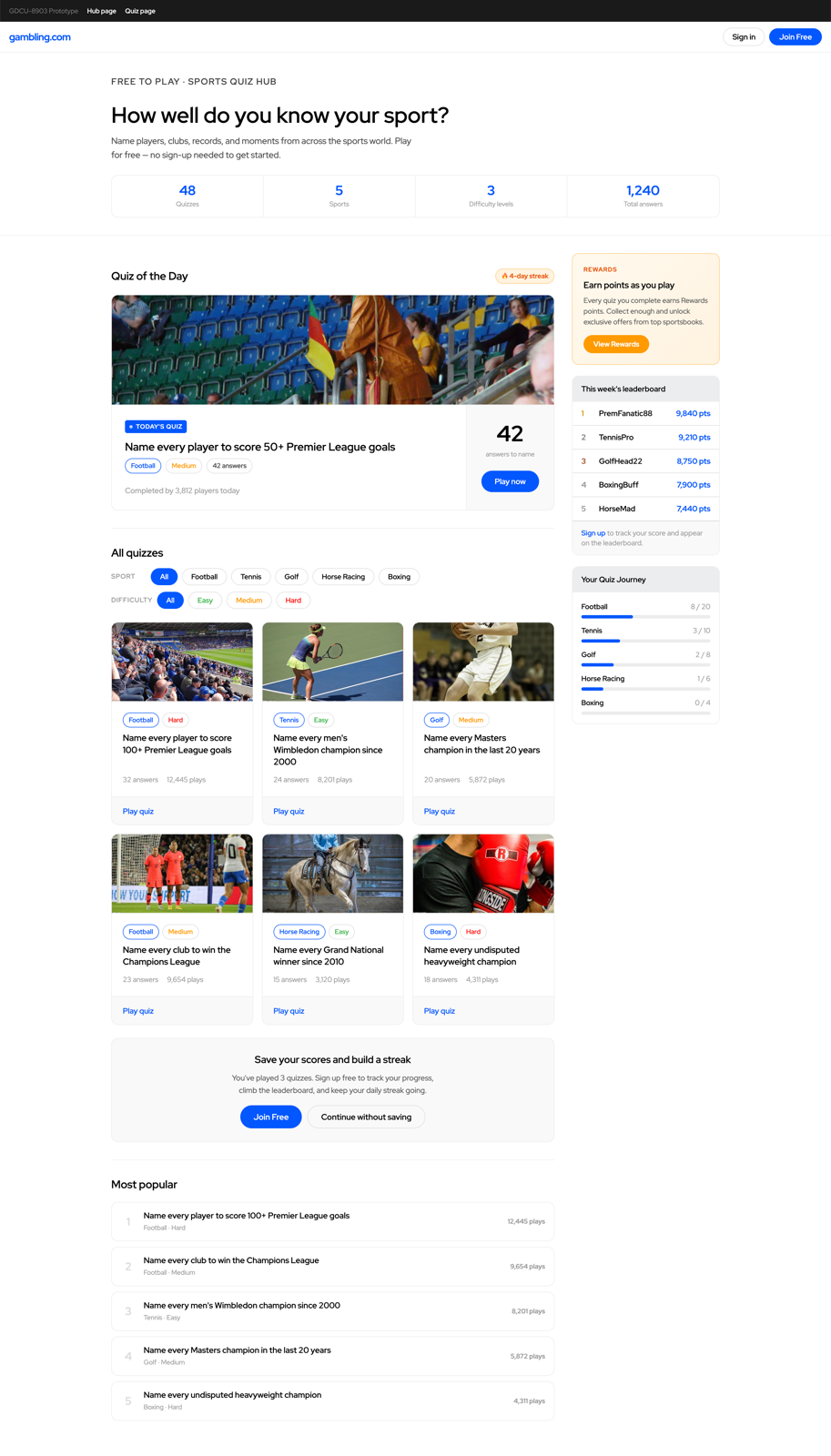
After the page reached production quality, the designs were captured in Figma — creating the source-of-truth design file from the live build, not the other way around. The Figma file was used for stakeholder review and dev annotation.
Outcomes
A fully functional, multi-component Sports Quiz Hub reached product review across two weeks — one week to build the skill.md, one week to build and ship the page — with no wireframes, no handoff document, and no pre-existing codebase. The question the project set out to answer ("can the design system build its own page?") was answered in the affirmative.
The page was designed to spec, reviewed by the product team, and passed to development. The workflow it validated — specification-first with AI-assisted code output, Figma as a downstream reference rather than a source of truth — reduced the design-to-dev handoff from the usual 2-week cycle to 3 days. This isn't a repeatable claim for all projects, but it establishes a working proof of concept for system-compliant pages where the design system is mature.
The longer-term output was the skill.md itself — now a reusable asset for any future AI build in the GDC stack, and the first time the GDC Orion Design System existed as a machine-readable specification. The workflow it proved — spec first, code second, Figma third — is the inverse of every prior GDC build, and the comparison to track going forward is time-to-handoff against the traditional Figma-first process.
2 wks
Week 1 building the skill.md from scratch. Week 2 building and shipping the Sports Quiz Hub — no wireframes, no handoff doc, no prior codebase
Reusable
The skill.md is a permanent asset — the design system is now machine-readable for any future Claude Code build in the GDC stack
Reversed
Conventional workflow inverted — code shipped first, Figma documentation created from the live output, not the other way around
Reflection
The skill.md was written upfront — but writing it once wasn't enough. The first output was technically compliant: it followed the design system. It still read as AI-generated. It had the right components in the wrong context, the right colours applied the way the spec permitted rather than the way the team actually used them. Compliant on paper. Wrong in practice.
What the process taught me was to treat every wrong output as a spec gap, not a prompt failure. Each time the output looked off, I didn't fix it in the generated code — I updated the skill.md, identified the missing rule, and ran the next prompt against the updated spec. One discovery that made a significant difference: mapping CSS class names directly to components in the skill.md. Once the AI knew which class name corresponded to which component and its exact usage rules, the outputs became significantly more precise — not just visually closer, but structurally correct.
The honest limitation is that this was a single page. The real test is whether the skill.md holds on a structurally different page without me in the loop to catch the gaps.